PDF, Word, Excel, CSV and TXT
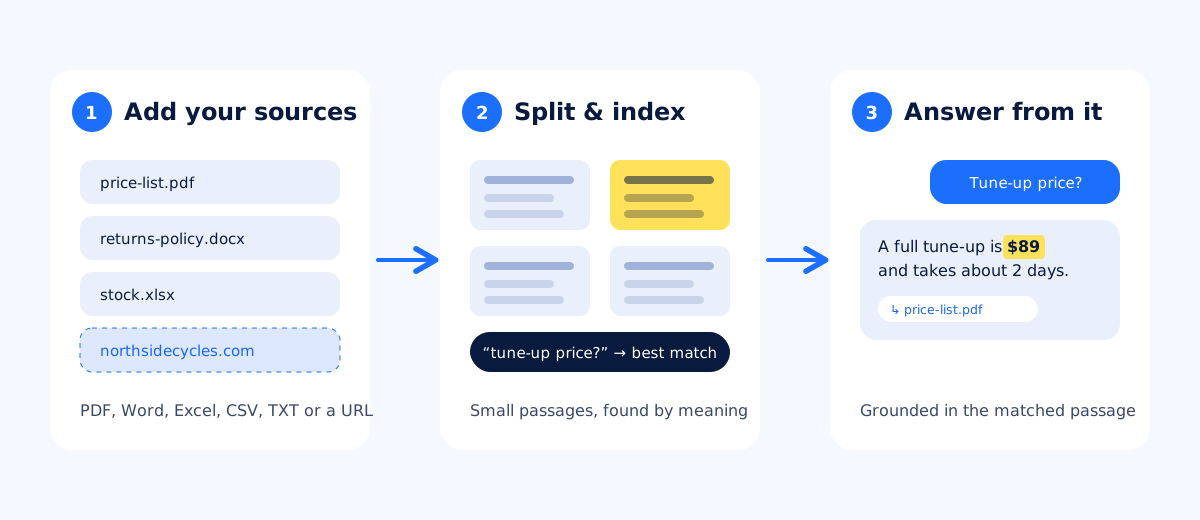
Upload the files you already have. Add your website too, and the agent learns from its pages.

Price lists, policies, product sheets, manuals and FAQs: upload them once, and askAgent answers your customers from them, and only from them.
Free plan, no card Website and WhatsApp Replies in any language

Upload the files you already have. Add your website too, and the agent learns from its pages.
Answers come from the passages in your documents that match the question. Nothing in your files? It says so.
A visitor asks “price tune up?” and it finds “Full tune-up: $89”. Matching is by meaning, not exact words.
Write your knowledge base once. Customers get answers in the language they ask in.
Documents are only used to answer your visitors’ questions. They are never used to train AI models.
Every question your documents can’t answer goes into the Unanswered report, so you know what to add.
askAgent splits your documents into small passages and indexes them by meaning. When a visitor asks something, it finds the best matches and answers from them, with no retraining when you change a file.
Full guide: How to train an AI chatbot with your business documents · Training on your website
Drag in PDFs, Word documents, spreadsheets and text files, and add your website’s address.
Ask what your customers ask in the Test chat tab. Missing answer? Improve the document and ask again.
Paste one line of code on your website. Update a document any time and answers update with it.
$0/ month
For trying it on one site. No card needed.
Start free$19/ month
For businesses with more sites, more questions and their own brand.
Request ProPro upgrades are activated by our team — request an upgrade from your dashboard. Online payment coming soon.
Still unsure? Start on the free plan and try it with your own documents.
PDF, Word (.docx), Excel (.xlsx), CSV and plain text files. You can also add your website’s address and askAgent reads its pages. Scanned PDFs that are only images have no readable text, so export them with text first.
No. Your documents are indexed so your chatbot can search them when a visitor asks something. They are only used to answer your visitors’ questions and are never used to train AI models.
Pro supports up to 100 documents and up to 10 websites with 500 pages. The free plan covers 1 website up to 20 pages.
Replace the file and your chatbot uses the new version once it has been processed. There is no retraining step.
The chatbot says it does not have that information and offers to pass the question on. The question is added to your Unanswered report so you can fill the gap.
You already have the answers your customers want: in price lists, policies, menus and product sheets. Here is how to turn them into an AI agent that answers from them.
Your website already answers most of what visitors ask. The fastest way to build an AI chatbot is to let it read those pages, so it can answer from them in a chat.
A chatbot that always has an answer sounds impressive, until it promises a discount you don’t offer. Here is why “I don’t know” is the most valuable thing your bot can say.
Upload what you have, paste one line of code, and your AI chatbot starts answering visitors today.

