
AI chatbot for WhatsApp: answer customers automatically
Your customers already message you on WhatsApp, often with the same questions and often after hours. An AI chatbot can answer them from your own price lists and policies, and hand the chat back to you whenever you want to talk yourself.

An AI chatbot for WhatsApp reads the messages that arrive on your business number and answers them for you. Not with canned menus (“press 1 for prices”) but in normal sentences, from the information you give it: your price list, your opening hours, your returns policy, your website. When a chat needs a person, you reply yourself and the AI steps back.
This guide covers what a WhatsApp chatbot should do, the two ways to connect your number, how to set one up in askAgent, and how to stay in control of every conversation.
Why put an AI chatbot on WhatsApp?
- Your customers are already there. For many small businesses, WhatsApp is where questions arrive first, long before anyone opens your website.
- Most questions repeat. Prices, stock, opening hours, delivery areas, how to book. Answering them by hand all day is slow, and every slow reply is a customer who may ask someone else.
- Messages don't stop at closing time. A WhatsApp auto reply that says “we’re closed” is polite. One that actually answers the question is better.
What a good WhatsApp chatbot does
- Answers only from your information. It replies from your documents and web pages. If the answer isn’t there, it says so instead of inventing a price or a policy (more on why that matters).
- Replies in the customer’s language. Someone writes in Arabic or Spanish and gets an answer in that language, from documents written in yours. See one set of documents, every language.
- Keeps the conversation going. It remembers what was said earlier in the chat, so “and in medium?” makes sense.
- Captures the lead. The customer’s WhatsApp number and name are saved straight away, and any other details they share are added when the chat ends. More in AI chatbots for lead generation.
- Stays out of the wrong chats. It answers direct messages only. Group chats, status updates and channels are ignored.
Two ways to connect your WhatsApp number
askAgent gives you two options. Both answer customers the same way; the difference is how your number is linked.
| Scan a QR code | Meta WhatsApp Cloud API | |
|---|---|---|
| How it links | Like WhatsApp Web: scan a code under Linked devices | Through your own Meta app and the official API |
| Setup time | About a minute | About 15 minutes |
| Which numbers | Any WhatsApp or WhatsApp Business number | A number registered in your Meta business account |
| Officially supported by Meta | No | Yes |
| Best for | Trying it out and small volumes | Higher volumes and long-term use |
The QR code uses the same protocol as WhatsApp Web. It’s the quickest way to start, but Meta doesn’t officially support automated use of it, so use a number dedicated to the bot rather than your personal one. Your phone can stay offline; if WhatsApp isn’t opened on it for about 14 days, the link expires and you scan again.
The Meta Cloud API is the official route for businesses. You create an app at developers.facebook.com, add the WhatsApp product and your number, and copy four details into askAgent: the phone number ID, the business account ID, a permanent access token and the app secret. askAgent shows you the webhook address and verify token to paste back into Meta, and checks your details with Meta when you save.
How to set it up in askAgent
- Create a WhatsApp bot. In your dashboard, click New bot and choose WhatsApp as the type.
- Add what it should know. Upload your price lists, FAQs and policies, or add your website’s address. This is the same knowledge a website chatbot uses; see training an AI chatbot on your documents.
- Tell it how to behave. In plain words: “Be friendly and brief. If someone wants a repair, ask for their name and when they can bring the bike in.”
- Connect your number. Open the WhatsApp tab and either scan the QR code with your phone (Settings or ⋮ menu → Linked devices → Link a device), or enter your Meta details.
- Test it. Message the number from another phone and ask the questions your customers ask. Anything it can’t answer appears in your Unanswered report, so you know what to add.
Take over any chat, any time
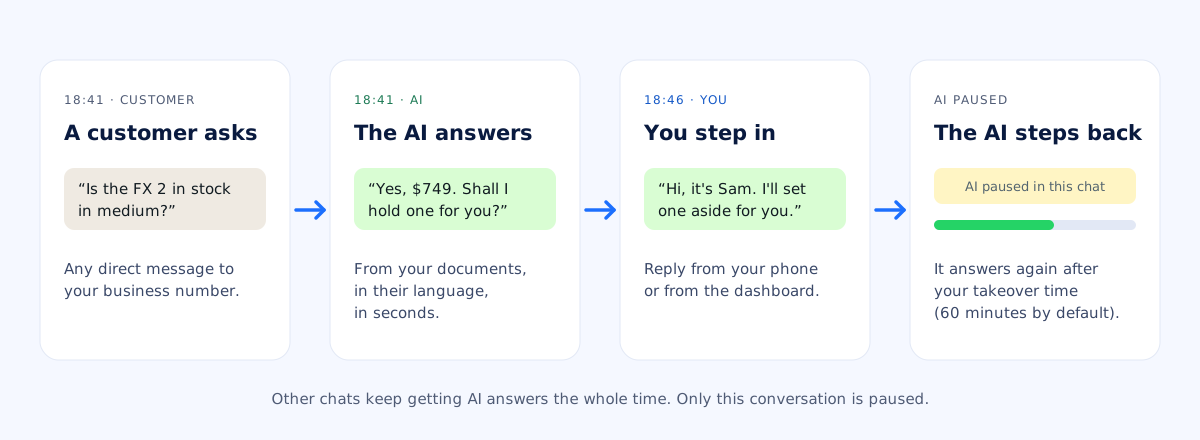
An AI chatbot shouldn’t lock you out of your own customers. When you see a conversation you want to handle, just reply, from the linked phone or from the conversation page in your dashboard. The AI stops answering in that chat and picks up again after the time you set (60 minutes by default; each reply you send restarts it). You can also pause the AI in a chat until you resume it.
Reading a chat doesn’t pause anything. Only sending a message does, so you can check how the AI is answering without getting in its way.
Choose when the AI answers
Many businesses want people to answer during office hours and the AI to cover the rest. With an AI schedule you pick the hours, for example weeknights from 18:00 to 09:00 and all weekend. Outside those hours, messages wait for your team, and you can send a short automatic reply such as “Thanks for your message! A member of our team will reply to you shortly.” It goes out at most once every 12 hours per chat, so customers who send several messages don’t get it repeatedly.
Tips for a WhatsApp chatbot customers like
- Use a dedicated number. Every direct message to it gets an automatic reply, so keep personal chats elsewhere.
- Keep your documents current. When a price changes, replace the file. The chatbot answers from the latest version.
- Write prices and policies as text. A price list that’s only a photo can’t be read; upload the original file instead.
- Keep answers short. WhatsApp is a chat, not an email. Ask for brief replies in your instructions.
- Check the Unanswered report weekly. It’s the fastest way to find what your customers ask that your documents don’t cover yet.
Already have a website chatbot? The same documents can power both. Add the chat widget to your website and a WhatsApp bot, and your customers get the same answers wherever they ask.


