
What is an AI website agent, and how does it work?
It looks like a chat bubble, but it works more like a well-briefed member of staff: it reads what your business has written down and answers visitors from it, any time of day.

An AI website agent is a chat assistant on your website that understands questions written in everyday language and answers them from your business's own information: your pages, price lists, policies and FAQs. Visitors type the way they'd text a friend. The agent replies like someone who has read everything you've published, because it has.
It's the newer, smarter cousin of the website chatbot. Older chatbots followed scripts and buttons; an AI agent reads, searches and writes. If you want the full comparison, see AI chatbot vs traditional chatbot.
The four parts of an AI website agent
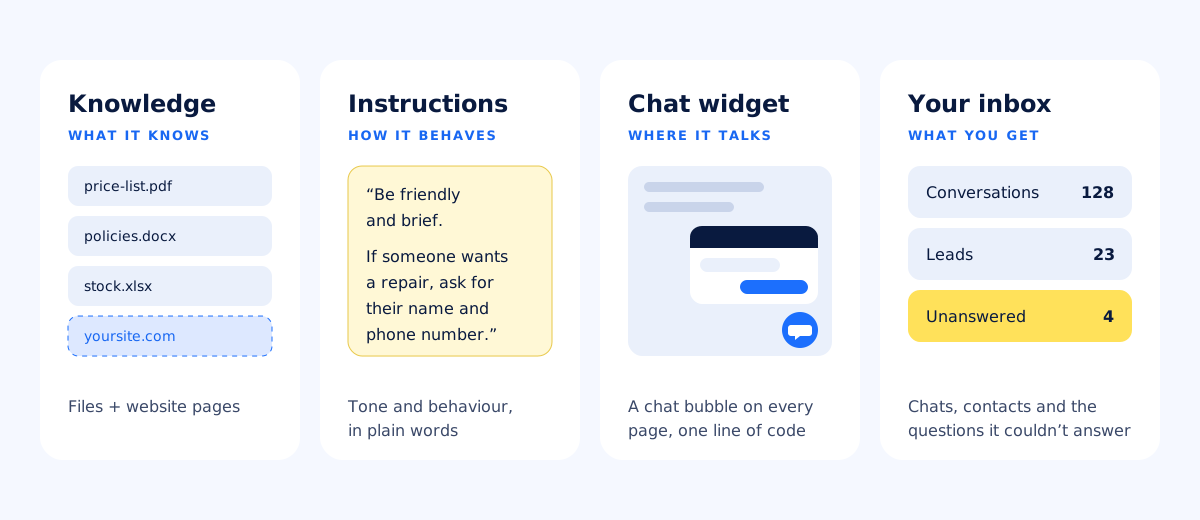
- Knowledge. The documents and web pages it answers from. With askAgent that means PDF, Word, Excel, CSV and text files, plus the pages of your website.
- Instructions. How it should behave, written in plain words: “Be friendly and brief. If someone wants a repair, ask for their name and phone number.”
- The chat widget. The bubble your visitors see, in your colours, added to your site with one line of code.
- Your inbox. Where the results land: full conversations, the contact details people shared, and the questions the agent couldn't answer.
How it answers a question
When a visitor asks “How much is a full tune-up and how long does it take?”, three things happen in a second or two:
- Search. The agent looks through your indexed documents for the passages that best match the meaning of the question, even if the visitor's words differ from yours.
- Answer. An AI model writes a reply using only those passages: “A full tune-up is $89 and takes about 2 days.”
- Hold back. If nothing relevant turns up, it says it doesn't know instead of inventing an answer, and offers to pass the question on. We wrote about why that matters in Why your chatbot should say “I don't know”.
This approach is often called retrieval-augmented generation. You don't need the term; what matters is that the answers come from your material, not from the internet at large.
What an AI website agent is good at
- The questions you answer every day: prices, opening hours, delivery, returns, how to book.
- Out-of-hours visitors: people browsing at 11 pm get an answer now, not tomorrow.
- Visitors in other languages: it replies in the language the visitor writes in, from documents in yours. More in How to create a multilingual AI chatbot.
- Turning questions into contacts: when someone wants a quote or a booking, the agent can ask for their details, which end up in your leads list.
What it doesn't do
- It doesn't know what you haven't written down. If your returns policy lives only in your head, the agent can't quote it.
- It doesn't act in your other systems. It answers and collects details; it doesn't change bookings or issue refunds.
- It isn't a replacement for your team. It handles the repeat questions so your people can spend their time on the conversations that need them.
Is it right for your business?
If people regularly ask you the same questions by phone, email or WhatsApp, and the answers exist somewhere in writing, an AI website agent will save you time from the first week. Start with your three most-asked questions, make sure they're answered in a document, and build from there. Our guide to training an AI chatbot with your business documents walks through it.


