
How to add an AI chatbot to your Shopify store
Shoppers ask the same things before they buy: when will it arrive, can I return it, does it come in blue? An AI chatbot answers from your store’s own pages and policies, instantly.

Every unanswered pre-sale question is a potential abandoned cart. An AI chatbot for Shopify answers them on the spot, from your shipping policy, returns policy, product pages and FAQ, and collects contact details when a shopper wants a follow-up.
Step 1: set up your chatbot
- Create a chatbot in askAgent.
- Add your store's address so it can read your pages, including your policy pages.
- Upload anything that isn't on the site: a sizing guide, wholesale terms, an FAQ file.
- Write short instructions, for example: “Be friendly and brief. If someone has a problem with an existing order, ask for their email and order number so the team can help.”
- Test it, then copy your snippet from the Embed code tab.
Step 2: add the snippet to your theme
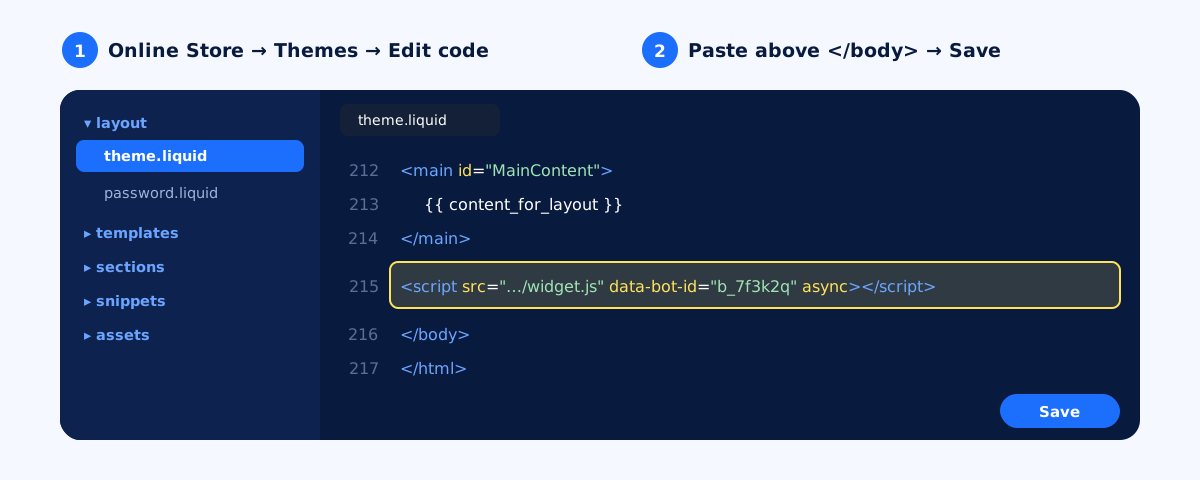
theme.liquid puts the chat on every page of your store.- In Shopify admin, go to Online Store → Themes.
- Next to your current theme, open the … menu and choose Edit code.
- Under Layout, open
theme.liquid. - Find
</body>near the end of the file and paste your snippet just above it. - Click Save and open your store. The chat bubble appears on every page.
Step 3: allow your domains
In askAgent, add every address shoppers use: your custom domain (with and without www) and your …myshopify.com address if you preview the store there.
What to teach it for a store
- Shipping: processing time, delivery times by region, costs and free-shipping thresholds.
- Returns and exchanges: the window, condition rules, who pays return shipping.
- Products: sizing, materials, care and compatibility, often best as a simple document.
- Payments: accepted methods, instalments, cash on delivery if you offer it.
The chatbot answers from your documents and pages; it doesn't look up individual orders. For order problems, have it collect the shopper's email and order number so your team can follow up. Details shared in the chat end up in your leads list.
On WordPress instead? See AI chatbot for WordPress.


